
 Welcome pack for 2 depositsGet 2 000 AUD + 100 Free Spins on slots and Live
 Loyalty ProgramEnjoy cashback, no-deposit rewards, and more

Instant
Quick & easy deposits

Up to 60 mins
Avg time for processing withdrawals

24/7
Customer Support

58,687 AUD
Max. win in 1 spin
Casino




Live casino





Promotions
Tournament
Golden Entry
Prize Pool
600 AUD real money + 60 FS
Promo
Install the App
What’s offered
20 no-deposit Free Spins


Level system
- Lvl.1/10Crystal0 - 30 CP
Your success starts here! Collect CP, unlock new levels, and get cool benefits for a bright game.
- Lvl.2/10Quartz30 - 110 CP
Just a little more and you can get:
- 5 FS


Lucky Hills Mobile Casino — Play on Any Device in Australia
At Lucky Hills, the full casino runs in your mobile browser without any app store download. Whether you’re on Android, iOS, or a PC, you get access to 7,000+ games, AUD deposits from $10, and the same account you’d use on desktop. This overview covers how to install the app, what you can play, how payments work on mobile, and what to do if something goes wrong.
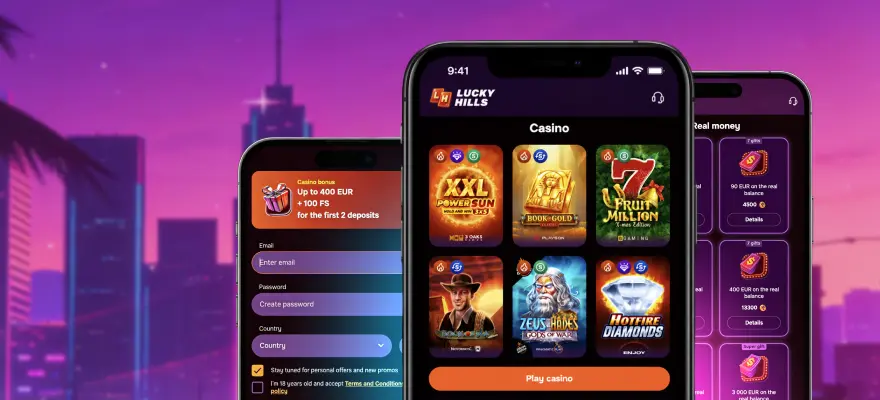
Lucky Hills Mobile Casino at a Glance
Our mobile casino runs as a Progressive Web App (PWA) — that means you install it directly from your browser, not from Google Play or the App Store. The result is a fast-loading casino shortcut that sits on your home screen and opens like a native app. Deposits start from AUD $10, and the casino runs on Android, iOS, and PC.
| Feature | Detail |
| Platform | PWA (browser-based install) |
| Android | Supported — install via Chrome |
| iOS | Supported — install via Safari |
| PC | Supported — desktop app available |
| Minimum deposit | AUD $10 |
| Currency | AUD |
Lucky Hills casino mobile gives you the full library from day one — no cut-down version, no missing categories.
Download the Lucky Hills Casino App
Because Lucky Hills uses PWA technology, there is no APK file to sideload and no App Store listing to find. You install it straight from the browser in a few taps, and it updates automatically whenever we release a new version — no manual updates needed.
Lucky Hills Android App
The Lucky Hills Android app installs from Chrome in under a minute. Open the casino site in Chrome, tap the three-dot menu, and select “Add to Home Screen”. Confirm, and the icon appears on your home screen ready to launch.
Steps to install on Android:
- Open Chrome and go to the Lucky Hills casino site
- Tap the menu icon (three dots, top right)
- Select “Add to Home Screen”
- Tap “Add” to confirm
- Launch from your home screen
Lucky Hills iOS App
The Lucky Hills iOS app uses Safari rather than Chrome for installation — Apple restricts PWA installs to its own browser. Open the site in Safari, tap the Share icon at the bottom of the screen, then choose “Add to Home Screen” and confirm.
Once added, the app icon appears on your home screen alongside your other apps. It opens without a browser address bar, giving you a cleaner view of the lobby.
What You Can Play on Lucky Hills Mobile
We have over 7,000 titles available on mobile, covering every major category. Game software comes from 84 providers, including Evolution, Yggdrasil, Betsoft, Spribe, BGaming, and Booongo — so the catalogue runs deep on every format.
Here’s what you’ll find in the lobby:
- Hot Slots — the most-played titles at any given time, updated regularly
- Bonus Buy — slots where you can skip to the feature round by paying a set amount upfront
- Jackpot — progressive and fixed-prize games where one spin can return life-changing amounts
- Crash Games — fast-format titles like Aviator where you cash out before the multiplier crashes
- Live Casino — real dealers via video stream, including roulette, blackjack, baccarat, and poker
- Game Shows — live hosted games in a TV-show format (Wheel of Fortune style)
- Megaways — high-volatility slots with a variable reel structure that can create thousands of ways to win
- Drops & Wins — games participating in prize-drop and tournament networks
Live casino content on mobile runs through providers such as Evolution, SA Gaming, Vivo Gaming, and Lucky Streak — the stream quality holds up well on a 4G or Wi-Fi connection.
Lucky Hills Casino Mobile Bonuses
Your welcome offer is available the moment you make your first deposit on mobile. Deposit at least AUD $30 and you receive a 100% match bonus plus 100 Free Spins. On your second deposit — again from AUD $30 — the match jumps to 200%.
On top of the welcome offer, we run regular promotions that work on mobile with no separate registration:
- Wednesday Free Spins — deposit on a Wednesday and receive up to 50 Free Spins
- Sunday Bonus — deposit on Sunday and get up to 30% extra on that deposit
- Weekly Cashback — up to 10% back on net losses each week, no deposit required to receive it
The Lucky Hills online casino VIP Club also applies on mobile. You earn XP by depositing and wagering — AUD $10 deposited gives you up to 20 XP, and every AUD $15 bet on slots gives up to 1 XP. VIP levels from Bronze to Diamond unlock higher cashback, deposit insurance, and faster payouts.
Payments on the Lucky Hills Mobile Casino
Deposits start from AUD $10 and withdrawals from AUD $80. Both work directly in the mobile browser — no desktop visit required to add a card or request a payout.
Methods available on mobile include Visa, Mastercard, Apple Pay, Neosurf, MiFinity, eZeeWallet, CashtoCode, and a full list of crypto options including Bitcoin, Ethereum, Litecoin, Solana, Dogecoin, and Tether in multiple networks. Apple Pay works natively on iOS with a deposit range of AUD $20–$500. Crypto deposits for most coins start from AUD $10 with a maximum of AUD $2,000.
The maximum single deposit via MiFinity is AUD $3,000 — the highest of any single method we offer. Maximum withdrawal per transaction is AUD $3,350.
Lucky Hills Casino App Requirements
The LuckyHills app requirements are minimal — any phone released in the last five years will handle the PWA without issue. No dedicated download is needed beyond saving the site to your home screen.
Here is what each platform needs:
| Device | OS | Browser Required |
| Android phone/tablet | Android 8.0 or newer | Google Chrome |
| iPhone / iPad | iOS 14.0 or newer | Safari |
| PC / Mac | Windows 10+ / macOS 10.14+ | Any modern browser |
If your phone runs an older OS version, the browser version of the casino still works — you just won’t get the home screen shortcut. All account functions, including deposits and withdrawals, remain fully accessible through the browser.
Lucky Hills App Troubleshooting
Most install problems come down to using the wrong browser. On Android, the “Add to Home Screen” option only appears in Chrome — if you’re using Firefox or Samsung Internet, switch to Chrome first. On iOS, the same option only exists in Safari.
If the casino loads but games won’t start, check that your browser isn’t blocking JavaScript or running in strict privacy mode. Clearing the browser cache usually resolves most loading issues. For login problems, use the password reset function on the login screen — Lucky Hills app support covers install errors, login failures, and live casino streaming problems in more detail.
If your deposit went through but your balance didn’t update, wait two minutes and refresh. Crypto deposits may take longer depending on network confirmation times.
Is the Lucky Hills Mobile Casino Safe
Lucky Hills holds a Curaçao licence, number 133283. That means all operations — including mobile play — run under a regulated framework that requires fair game outcomes and player fund protection. The licence number is publicly verifiable.
Account verification (KYC) is required before withdrawals are processed. You complete it in your profile under the Verification tab. Accepted documents include a passport, driver’s licence, ID card, or residence permit — the document must be valid for at least one more month, and both sides must be uploaded if the document has two sides. A live selfie with head rotation is also required. Getting verification done before your first withdrawal request means there’s no delay when you’re ready to cash out.
Get Started on Lucky Hills Mobile
Pick your device, open your browser, and install the app in under two minutes. Your existing account works immediately — no re-registration, no separate mobile login.
Steps to get started:
- Open the Lucky Hills site in Chrome (Android) or Safari (iOS)
- Add to Home Screen using your browser’s share or menu option
- Register or log in, make a deposit from AUD $30, and claim your welcome bonus
Register now to claim your first-deposit bonus of 100% plus 100 Free Spins.
Frequently Asked Questions
Is there a Lucky Hills APK file I can download?
No. Lucky Hills uses PWA technology, so there is no APK. You install directly from Chrome on Android by tapping “Add to Home Screen” — the process takes under a minute and no file download is involved.
What Android version do I need to run Lucky Hills?
Android 8.0 or above is sufficient. Most phones released after 2018 already meet this requirement, so the vast majority of current Android devices will work without any issue.
Can I play Lucky Hills on a tablet?
Yes. Both Android tablets and iPads are supported. The browser install process is identical — Chrome on Android tablets, Safari on iPad — and the full game library is available on both.
Can I use Apple Pay on mobile?
Yes. Apple Pay is available as a deposit method on iOS with a minimum of AUD $20 and a maximum of AUD $500 per transaction. It works natively through Safari on iPhone and iPad.
What happens to my bonus if I switch from desktop to mobile?
Nothing changes. Your balance, active bonuses, and VIP progress are all tied to your account — not the device. Log in on mobile and everything carries over exactly as it was on desktop.
Lucky Hills is always with you!
Install the application and participate in thePlay with the App promo.
We use innovative installation technology directly from the browser. For any operating system.